
[oeasy]python0135_变量名与下划线_dunder_声明与赋值
![[oeasy]python0135_变量名与下划线_dunder_声明与赋值](http://pic.ttrar.cn/nice/%5boeasy%5dpytho.jpg)
变量定义
回忆上次内容
- 变量 就是 能变的量
- 上次研究了 变量标识符的 规则
- 第一个字符 应该是 字母或下划线
- 合法的标识符可以包括
- 大小写字母
- 数字
- 下划线
- 还研究了字符串(str)的函数
- isidentifier
- 查询字符串
- 是否为合法标识符
- 最后发现
- 这个isidentifier函数有时候不好使?
![[oeasy]python0135_变量名与下划线_dunder_声明与赋值](https://img-blog.csdnimg.cn/img_convert/2228867e85c9c2e7814c309819ddd8c4.png)
- 这怎么理解呢??🤔
翻看文档
- and 属于关键字
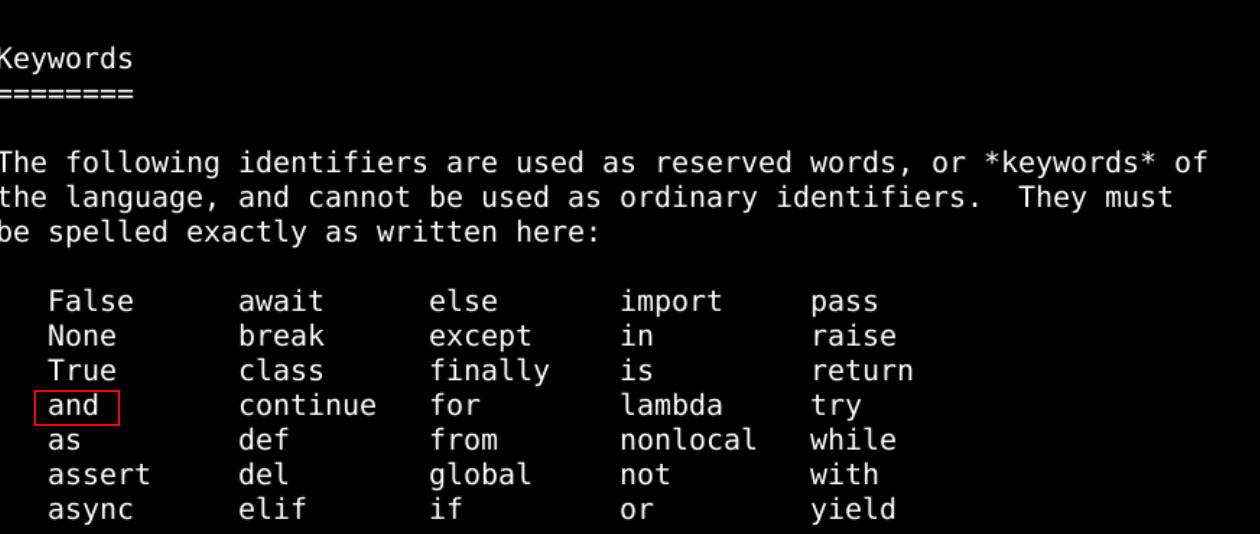
- 如何判断一个字符串是否是关键字呢?
![[oeasy]python0135_变量名与下划线_dunder_声明与赋值](https://img-blog.csdnimg.cn/img_convert/4aaa305cb002ea252e061ec145d67555.png)
判断是否为关键字
![[oeasy]python0135_变量名与下划线_dunder_声明与赋值](https://img-blog.csdnimg.cn/img_convert/4591a790230887ae9017d512af68cde1.png)
-
关键字 是不能作为标识符的
-
dir()查询模块的时候
- 经常会看到下划线
![[oeasy]python0135_变量名与下划线_dunder_声明与赋值](https://img-blog.csdnimg.cn/img_convert/b01c54563b904885c81e8a498d87d3a4.png)
- 这些下划线如何理解?
下划线
- from module import * 时
- 以下划线开头的变量
- 不被其他模块引用
- 以下划线开头的变量
![[oeasy]python0135_变量名与下划线_dunder_声明与赋值](https://img-blog.csdnimg.cn/img_convert/1a1668189ee1505033113cedf87f73c6.png)
- 所以 _a 可以作为模块内部的变量或者函数
内部变量
- 除非明确点名
![[oeasy]python0135_变量名与下划线_dunder_声明与赋值](https://img-blog.csdnimg.cn/img_convert/2d5e2c6d17eff7b50a2d09d31a9c321d.png)
- 指清名字 _pi
- 是可以导入的
- 不点名不能用吗?
不点名
![[oeasy]python0135_变量名与下划线_dunder_声明与赋值](https://img-blog.csdnimg.cn/img_convert/9e5a79dac8a65a31a365be24a30dcfc0.png)
- from random import *
- 无法导入_e
![[oeasy]python0135_变量名与下划线_dunder_声明与赋值](https://img-blog.csdnimg.cn/img_convert/add420b3e1f9c775259f503360f25586.png)
上次的值
- 在游乐场里
- _下划线 意味着上次的值
![[oeasy]python0135_变量名与下划线_dunder_声明与赋值](https://img-blog.csdnimg.cn/img_convert/0fbd0532f3122d905339c65e196f7eb6.png)
后面的下划线
- 在后面加上下划线
- 一般是为了区分已经有的标识符
![[oeasy]python0135_变量名与下划线_dunder_声明与赋值](https://img-blog.csdnimg.cn/img_convert/a03b0b326db61e3ca31b5210e9d410d0.png)
- 使用max
- 会把max函数 屏蔽掉
- 使用max_
- 不会屏蔽 max函数
两端双下划线(dunder)
![[oeasy]python0135_变量名与下划线_dunder_声明与赋值](https://img-blog.csdnimg.cn/img_convert/61992d8205896e40d0c91081ac11054f.png)
- 系统定义的标识符
- 模块名
- 函数名
- 变量名
![[oeasy]python0135_变量名与下划线_dunder_声明与赋值](https://img-blog.csdnimg.cn/img_convert/359bd2e2c05c96eca4fb4845affa6502.png)
- dunder变量都是有用意的
- 不要轻易破坏
前有双下划线
- 类里面的私有名
- 无法直接存取
- 目的是
- 避免 和 父类或子类的私有变量 重名
![[oeasy]python0135_变量名与下划线_dunder_声明与赋值](https://img-blog.csdnimg.cn/img_convert/f880381d6a90c4e2873d4b1468c126ed.png)
- 我们再来看看 o 这个变量标识符
细节
o两边并不加引号- 因为 这里的
o是 变量标识符 - 而不是 字符串
- 如果加了双引号 就是字符串了
- 因为 这里的
![[oeasy]python0135_变量名与下划线_dunder_声明与赋值](https://img-blog.csdnimg.cn/img_convert/b4af2e089eb5c2261b6ca9388b710687.png)
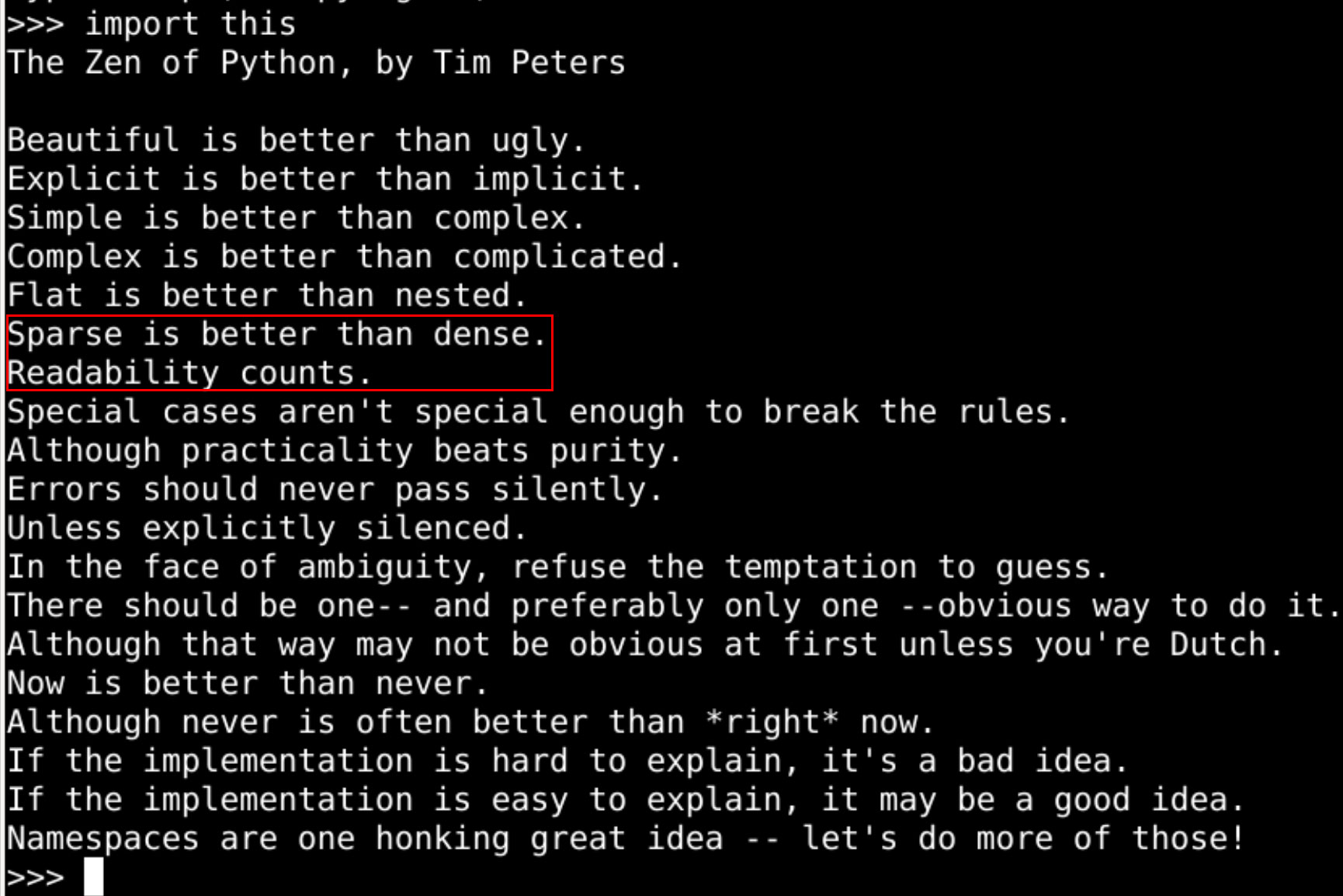
- 在等号两端 都保留 有一个空格
- 可是 为什么要 加空格呢?
可读性
- 增加文档的可读性
- 这
不会影响程序的执行速度
- 这
![[oeasy]python0135_变量名与下划线_dunder_声明与赋值](https://img-blog.csdnimg.cn/img_convert/029f687473c32cb2c01e6b119b47c075.png)
- 这两句话从何说起
加空格的原因
- 这两句话来自于python之禅
- 现在到底有多少变量呢?
locals()
- 查询本地变量
- 有一个内置的函数叫做 locals
![[oeasy]python0135_变量名与下划线_dunder_声明与赋值](https://img-blog.csdnimg.cn/img_convert/829c9a03884154bfa092b683e1933c75.png)
- 可以查询关于 locals 的帮助
![[oeasy]python0135_变量名与下划线_dunder_声明与赋值](https://img-blog.csdnimg.cn/img_convert/7a4daee80b26ce806dd0c1d7225a2323.png)
- 返回的是一个包含当前域中所有变量的字典
- 声明和赋值都使用等号
- 声明并赋值 变量o 之后
- 变量o 真的在内存里有位置了么?
- 我们来看看
具体位置
![[oeasy]python0135_变量名与下划线_dunder_声明与赋值](https://img-blog.csdnimg.cn/img_convert/d4591db52cd669836eef5e22304fb6d9.png)
- id函数是什么意思?
- help(id)
![[oeasy]python0135_变量名与下划线_dunder_声明与赋值](https://img-blog.csdnimg.cn/img_convert/38dd0a5b1c03927a997e6d5c8e080199.png)
- id返回 对象o的标识符
- o 确实在内存中 有了位置
- 但是如果 我们给变量新赋 一个值
- o 确实在内存中 有了位置
- 那么 存储变量的位置
- 还是那个 内存地址 么?
实践
- 虽然 a这个变量名 没有变
- 但是 id(a)变了
![[oeasy]python0135_变量名与下划线_dunder_声明与赋值](https://img-blog.csdnimg.cn/img_convert/6c6c3f25b9e0640115938af0beae27ba.png)
- 也就是说
- a这个容器的 内存位置没变
- 但是a所指向的 变量位置
- 在内存中的位置 变了
- 两次赋值 都是STORE到a这个NAME里面
- 第二次赋值 和 第一次赋值
- 有什么区别吗?
- 第二次赋值 和 第一次赋值
区别
- 变量的声明和赋值究竟有什么不同
- 第一次赋值时
- 声明和赋值是同时完成的
- 第一次赋值时
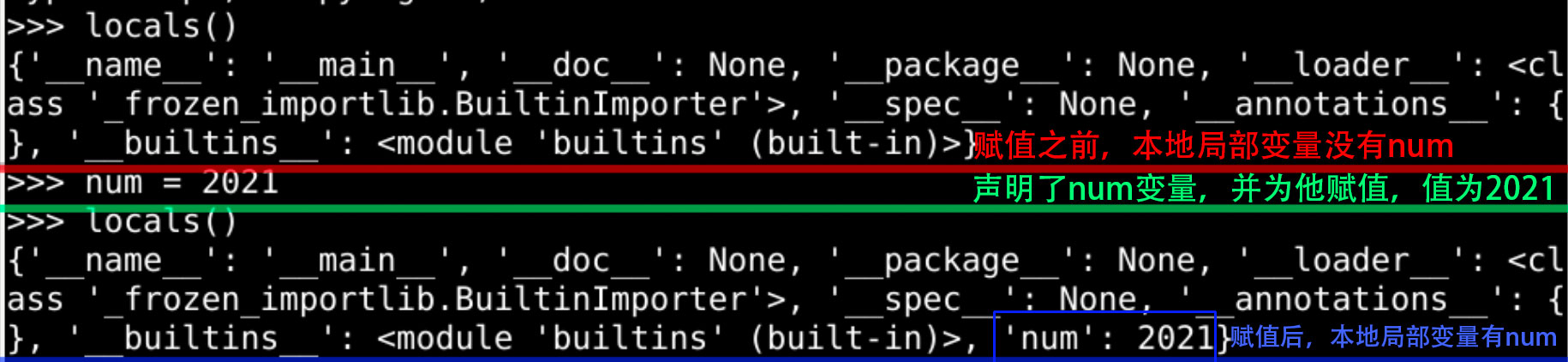
- 如果是 第二次赋值 呢?
纯赋值
- 声明了之后
- 再有 等号赋值 就是 第二次赋值
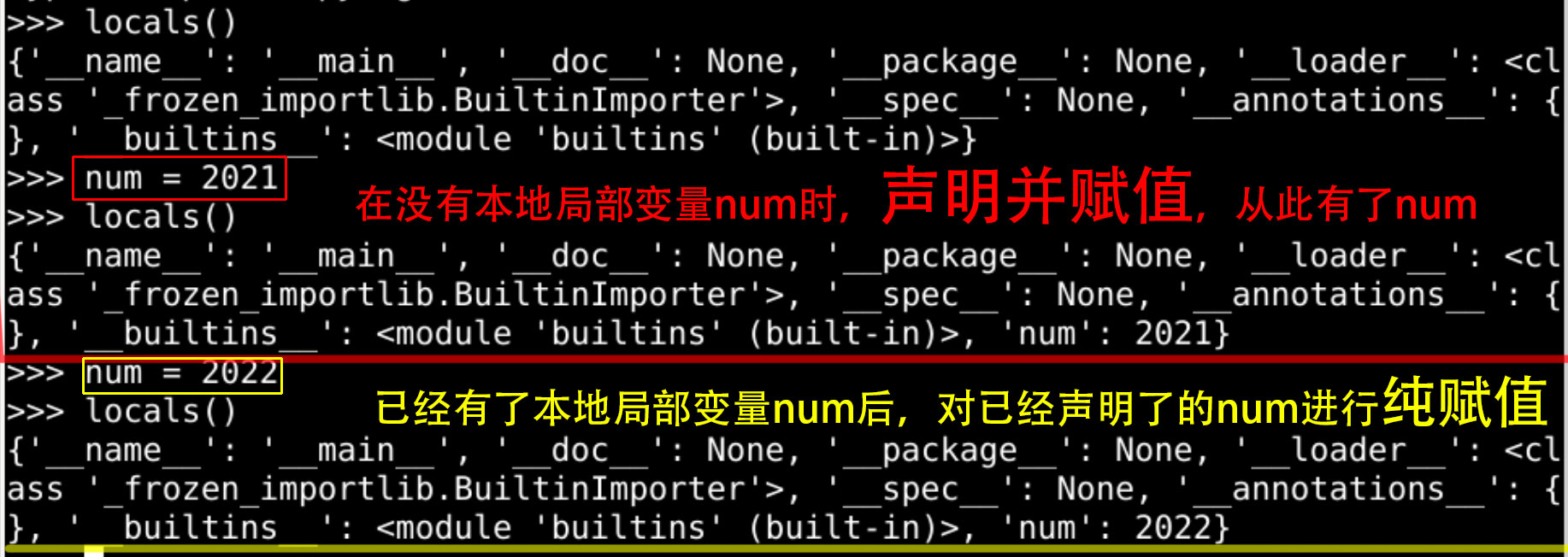
- 是 纯赋值
- 没有声明新的变量
总结
-
这次 了解了isidentifier的细节
- 关于 关键字
- 关于 下划线
-
如何查询 变量所指向的地址?
- id
-
如何查询 已有的各种变量?
- locals
-
如果 用一个变量a的值
- 给另一个变量b 赋值
- 是什么样的过程 呢??🤔
-
我们下次再说!👋
-
蓝桥->https://www.lanqiao.cn/courses/3584
-
github->https://github.com/overmind1980/oeasy-python-tutorial
-
gitee->https://gitee.com/overmind1980/oeasypython